Activity Builder
Role
Visual Designer
Duration
4 weeks/phase
Tool
Sketch, Unity, Photoshop, After Effects, Hand Drawing
Project
Activity Builder is a core function in Studio, the top sales app in zSpace.
Studio is the top education ARVR app face to K12 has been learnt, developed by zSpace for 2 years. It is a rich model exploration and presentation tool that allows students to compare, dissect, analyze, measure, annotate thousands of 3D models from the zSpace Model Gallery.
I led the Activity Builder UIUX redesign project for 4 months, and the first phase has been released, the second phase implement is under planing.
In this project, I closely work with a stakeholder, a product director, engineers and QA team.


Discovery
Defination
Development
Delivery
Discovery
Original Design


What is Activity/Activity Builder?
Teachers can DIY their own class activity and worksheet before class. During the class, students use the feature to answer questions and complete quiz. The QA section is not the individual part, it's not the same as we know 'Quiz Time'. Activity/Activity Builder goes through the whole class. The teacher leads the students to listen, speak, operate, and analyze in a step-by-step manner according to the rhythm of the class activity. So each part of QA won't make the students feel boring. As our Studio mainly face to young user, it is difficult for users of this age to concentrate for a long time. So the way of answering questions while controlling ARVR objects is more acceptable to our user group.
Product Goal
Make students more interested in question and answer during the classes
Bring kids a fun classroom!
but, we have Contradiction what I have received from internal users
1) Young kids and new users hard to control the stylus to select, click with tiny table sheet. Spent much time during the class
2) After a period of time working on the sheet , the similar color of interface and background made me confused and dizzy, especially I wears the 3D glasses.
3) Some icons without title or tooltips, as a new user doesn't know its function.
User Observation
I went to several schools to observe our end user how they use our products. I have also listed questions for teachers and students. Each day I join 4 zSpace classes with different grade students (4-6 grade). All classes took the same topic and contents. From the different ages, users show different product availability and experience. The observation help me getting closer to the users' pain points and demands.


Science lab class for 4-6 different grades students
What I found and summarized from users' pain points and demands

Lower grade students

Higher grade students

Teachers familiar
with high-tech
.png)
Teachers don't familiar
with high-tech
Facts
Pain Points
Demands
• Relatively short-time attention
• Very curious about new things
• Enjoy helping each other
• More students ignore what they
need to scroll down to see
• Spend much time to finish
worksheet
• Feeling dizzy
• Want to looks cooler
• Relatively long-time attention
• Very curious about new things
• Enjoy helping each other
• Some students ignore what they
need to scroll down to see
• Want to looks cooler
• Enrich the course content
• Help students interact with class who can not speak english well.
• Students need help for hardware problem which take much time during classes
• Easy to learn how to control and
use product
• Student get much longer
attention during the class,
especially for the lower grade
student
• Speed up the classroom
• Enrich the course content
• Help students interact with class who can not speak english well.
• Hard to work with HW
• Can not remember too many
function
• Students need help for hardware problem which take much time during classes
• Need more zSpace device for
teacher using out of the class
Definition
-
Students can not find vital information with less interaction - Lack of information hierarchy
-
In the AR state (with eye glasses), the vision cannot be clearly separated from the background, which leads to dizziness when staring for a long time - Lack of visual contrast
-
Hard to interact with hardware - Lack of clear guidance and directories, increasing unnecessary searches and operations
Sort out the most repetitive pain points
-
Reorganize existing content, categorize and prioritize by user journey - Hierarchy
-
Overall upgrade of the current visual design to align with the latest component library - Design System
-
Clearly display two major blocks of menu and contents - Visual Design
Corresponding solutions
From stakeholder request, we need a quick solution to launch the 1st phase. It's a challenge for me to make a design decision. The whole design would be separated into 3 phases, and kept the 1st phase as simple as possible.
Considering the integrity of the design for the product, when I was designing the 1st phase, I also had to consider the scalable for the next 2 phases.
Development
Final 3rd phase
Wireframe


Dellivery
Final In-App Preview
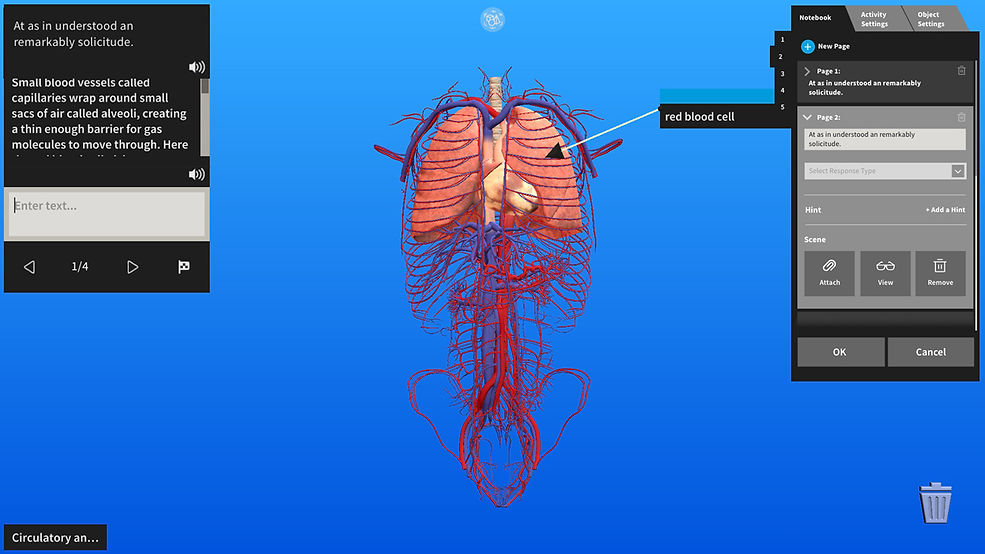
After completing all the designs, I rebuilt the visual works layer by layer in Unity. After repeated tests, we can finally use it normally in the zSpace ARVR large screen device.
Timeline
2 weeks
Interview
Persona
3 month
1st phase
design
2nd phase
design
3rd phase
design
First phase implement and flow up
2 month